
Who is this post for?
Development environment for what?

In this post I will focus on my preferred setup when developing my Flutter mobile applications. You can of course check them here and in this post I will focus on describing how I prepared all the tools I needed to create these apps. As this can become quite extensive description, I decided to skip my Game Development environment setup for a future post. For the time being, below you will find:
- IDE(s) – Integrated Development Environment
- Source control tools
- AI tools
- Other software (Graphic design, Audio and video editing applications)
Let’s read on!
IDEs
As a developer it goes without saying that you will be writing code in some IDE (Integrated Development Environment). If you’re not familiar with IDEs, I recommend starting with a beginner tutorial first. Still, there are tons of options, most popular being JetBrains IDEs (mostly Java-, Python-, and web‑oriented), Microsoft tools like VS Code and Visual Studio (mostly .NET‑oriented, although VS Code can be used for almost anything).

My personal favorite is this one (maybe you can guess just by the screenshot?):
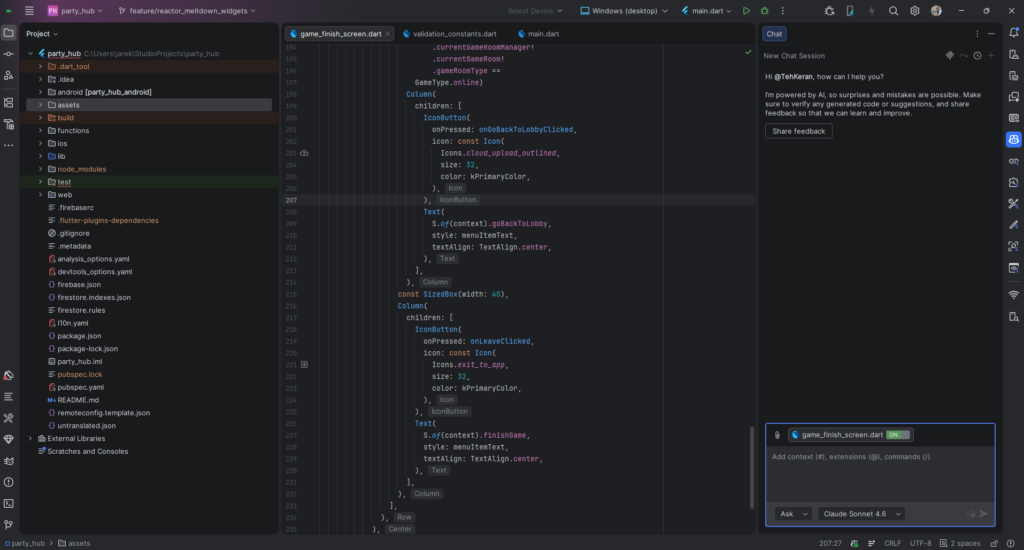
If you guessed it – good job! This is Android Studio based on IntelliJ engine and a lot of IDEs are based on that engine for a very good set of reasons. TLDR: It’s just damn good. If that doesn’t convince you, here goes a list:
- User experience is simply the smoothest – setting up the windows you want to use, tools on each side feels just natural and very easy to customize. Not to mention all the styling themes and so on. I usually don’t customize too much, but I know you can do wonders with these options.
- Git integration is one of the best I saw – I used a lot of IDEs from different providers and simply put, in IntelliJ-based IDEs, the integration with GitHub works the most stable. Some developers prefer using Git only from the command line, but I’ve never seen a problem with a good UI. In IntelliJ/Android Studio you can do almost everything you need: fetch from GitHub, see branch status, check changes, and use the commit window with AI tools to generate messages. For me, it’s simply the best out there. I do recommend installing GitHub toolbox plugin which improves the integration even further.
- Plugins, plugins everywhere! – I mentioned one above, but overall, there are tons of plugins. You can argue that VSCode offers the same thing – that’s true and I’m not really into measuring which IDE offers more plugins, I just know that in IntelliJ-based IDEs, the plugin integration is very smooth and you can find basically a plugin for everything. My favorite ones are: GitHub copilot, Flutter Intl (for translations), ADB Wi-Fi (for debugging on phone via Wi-Fi, the built-in one is very buggy), SimpleSqliteBrowser (for opening the SQLite db from the device). And obviously, I use the Flutter and Dart plugins which are critical for writing apps in Flutter.
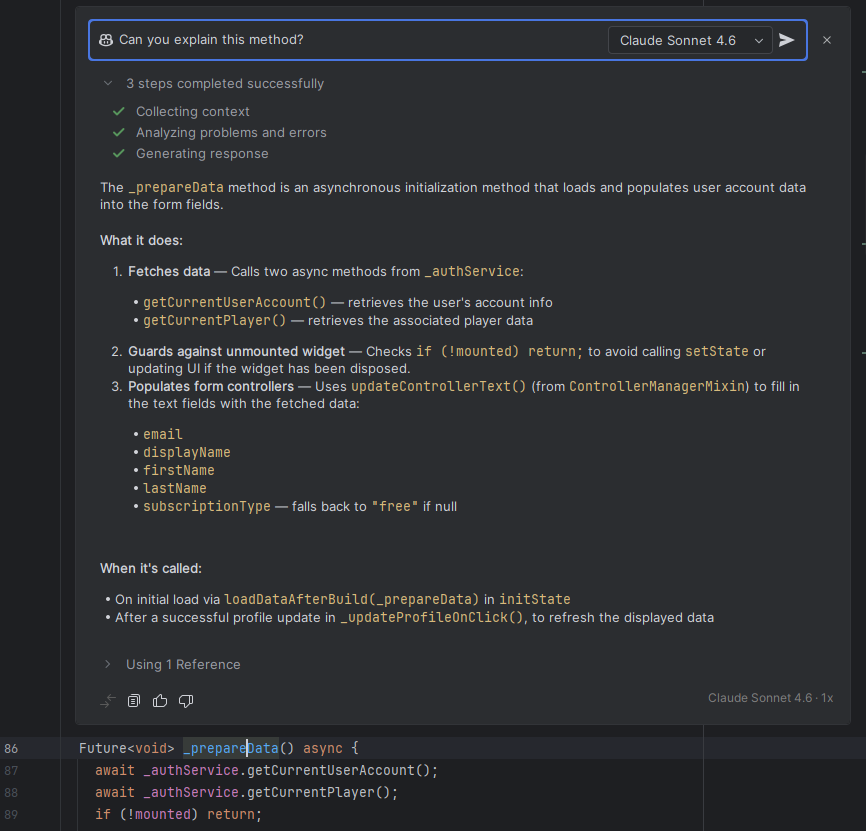
- AI-Assisted programming – In most modern IDEs you can find some AI-integration (with Gemini, GitHub Copilot, Claude, etc.). IntelliJ-based IDEs have all of them and it’s working pretty great. I especially like two functionalities I use with GitHub copilot (I have the paid license – will explain why in the dedicated chapter below). The first functionality is the auto-proposing of code when writing – I suppose it’s pretty standard these days – but what I like in IntelliJ, you can also have an inline chat to ask questions to specific code lines:
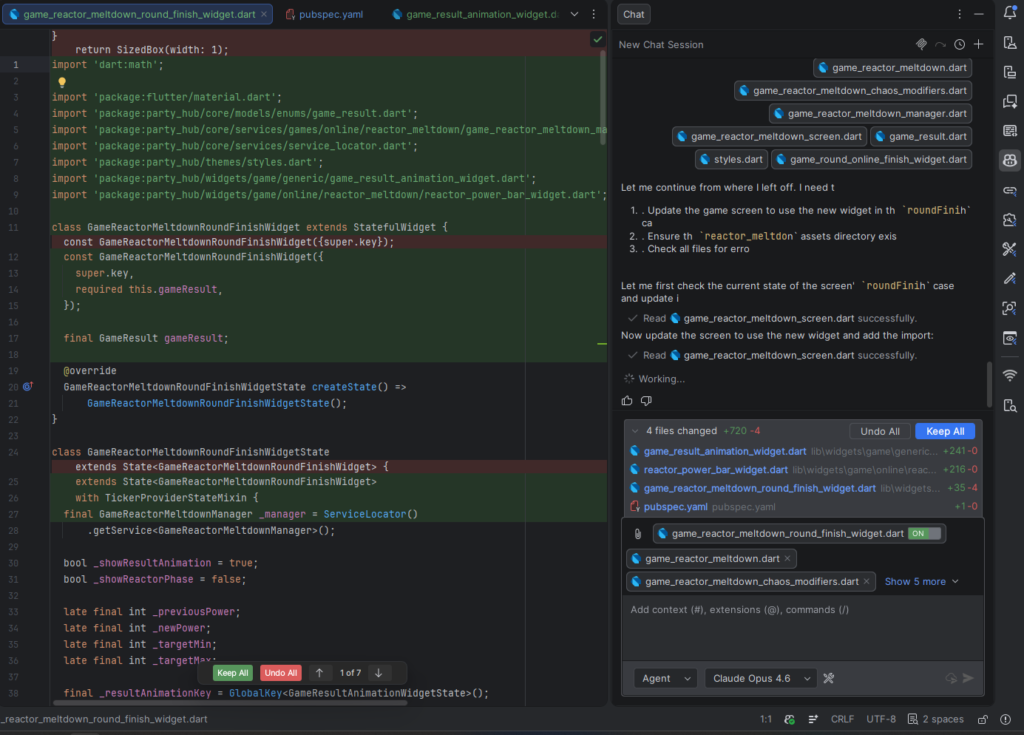
- AI Agentic mode – The second functionality I wanted to mention is the agentic mode that actually writes the code for me. In my setup, I mainly use GitHub Copilot but also sometimes Claude Code. Both are capable of updating code, Claude goes a step above because you can use MCPs to connect to your documentation, Jira or whatever you use to enrich the context for Claude. But for simple development of new features, finding bugs or restyling, I use the build-in GitHub copilot plugin with the agentic mode, for example:
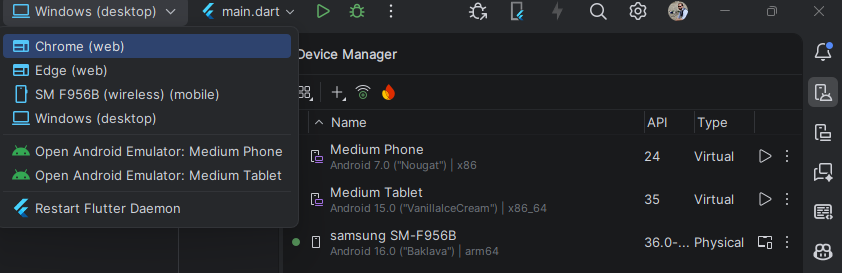
- On-device debugging is smooth – In one of my previous blog posts (Common traps in game development I encountered) I was writing that you should test on actual target device (mobile, tablet, PC) as soon as possible. With IntelliJ and the ADB Wi-Fi plugin, it’s very easy to debug over Wi-Fi. Basically, for my GameRoom app where I need multiple devices to connect to one game room, I have a phone, a tablet and an emulator running to have 3 real “Players” enter the room. And then I can debug on each of them separately. It’s not always super stable, but in most cases it’s good enough.
What about other IDEs?

I’m not a fanatic about IntelliJ-based IDEs. To be honest, when it comes to technology I believe we should use everything at our disposal. This means, I’m not one of the Android vs iOS or Xbox vs PlayStation debates, I like to use all. At home I have Android devices and iOS devices, I have a Windows machine and I have Macbooks. We might be side-tracking here, but I strongly believe if you remain open to all technology, you can only grow. Avoiding a technology for non‑technical reasons feels limiting to me.
Anyway, I also use VS Code quite often for quick text and code editing. For example, writing SQL statements, editing configuration files outside of my project, editing XML or JSON files, analyzing logs, preparing Python scripts, etc. It’s quite powerful as well and offers plenty of plugins. However, I have never fully integrated VS Code as my complete IDE for code writing and debugging. It might just be personal preference, but from time to time I like to see what other IDEs can do.
My general rule: there is no one solution for all problems.
Source control
I’ve tried a few source control systems and I have to admit I was never a big expert on it. For a very long time, GitHub scared me. One wrong click could create hours of cleanup for a more senior developer (I think it happened to everyone at least once in their software development career). I started with Microsoft Team Foundation Server (called today Azure DevOps Server), then a bit with Bitbucket for my games (mostly due to large asset saving) and finally I reached GitHub and I stayed there.

And now, why GitHub?
- It’s easy to learn – If you are just beginning with source control, the concepts and details can be overwhelming. GitHub has a way of making it a bit easier to understand what is happening when. It also offers a User Interface for most of the actions, so if you are not a terminal-lover (which GitHub also offers), then you will like it. In truth, other source control platforms (like Bitbucket and Azure DevOps Server) also offer a UI.
- Great integration – By now, in my setup I have the following integrations with GitHub: Android Studio / IntelliJ Rider (for Game dev), VSCode, OpenAI’s GitHub integration (used to be called Codex?), Claude Code, SonarQube online. See the chapter about my AI-assisted development process below. But basically, GitHub is integrated almost everywhere with great plugins, especially for IntelliJ-based IDEs.
- It’s free – I’ve been using it for years now andI don’t pay for anything except the GitHub Copilot license. I have multiple private repositories where I store my code, I have some public ones as well just for showcasing. These days GitHub is just the golden standard.
- GitHub Copilot is great – They ship a lot of new functionalities these days with GitHub copilot. Lately, I’ve been using the Copilot agent directly from the my repository website in GitHub. I just ask to refactor something or find stability or performance issues and the agent does all the job remarkably well.
- Collaborating is easy – User management is very easy to setup and you can invite people to work on your repo quite easily.
I could most likely list a lot of other reasons, but I preferred to focus on what won me over instead of repeating the obvious benefits of using a source control. My biggest tip however is that you shouldn’t skip using source control for your apps, no matter at which stage you are – especially if you are just beginning. Benefits of using it I listed in my other blog post about my product design process.
AI Tools

And now we come to the sexy part. AI is everywhere, it has to be mentioned everywhere, those who do not jump on the AI train risk getting left behind. Just by mentioning AI here I might get some SEO benefits, hehe.
Anyway, it is indeed true that these days (2026), not using AI for software development, brand development or just in general is a huge missed opportunity. Even when writing this post, I ask Perplexity in my Comet browser to review what I am writing to make sure I don’t make mistakes or the things that I write are not incorrect. It’s just the reality, we can fight it or run along with it.
So, how does my development process look like with AI tools?
- ChatGPT – I use the paid version of ChatGPT mostly because I generate a lot of images and ask a lot of questions. For me, ChatGPT works quite well when it comes to architecture and idea workshopping. I know opinions differ, but I’m simply used to ChatGPT’s workflow. Sometimes I experiment with Gemini and Claude for architecture discussion and indeed, sometimes Claude proposes much better technical solutions. Still, whenever I am thinking about writing a new app or functionality, I brainstorm with ChatGPT until I get a nice design
- GitHub Copilot in IDE – I use the paid version of GitHub Copilot to have more tokens available and more models. So, after I have my technical and functional design prepared, I use GitHub copilot as a plugin with Android Studio / IntelliJ where I:
- Use the agent to write new code for me or refactor existing
- Ask questions about code base
- Propose code as I write
- Generate test cases
- Troubleshoot bugs and stability issues
- Prepare commit messages
- GitHub Copilot in GitHub website – The next step is I push my branch to GitHub server where I create a pull request that I assign GitHub copilot to review it. On top of that, I have OpenAI GitHub integration (old name: Codex?) integrated with my GitHub copilot so I get another set of AI-eyes to review my code. So I have 2 code reviewers for the code I mostly generate in the IDE. If I had to be honest, these days I think my code is about 40% generated by AI and it’s mostly frontend which is not my strong suit. I still code a lot and I still do a lot of architecture decisions, but I at least consult everything with AI to be sure I don’t fall into traps.
- Claude Code – Lately, I’ve been also experimenting with Claude code, especially for troubleshooting and bugfixing, I think it works pretty well there. So For new functionalities and especially frontend development, I still prefer GitHub Copilot in my IDE (although with Claude Sonnet 4.6 or Opus 4.6 models :). I would estimate, that in a few months, my ratio of AI-generated code will grow to around 80% where the remaining 20% is really just setting up the skeleton of what I want to build. I don’t call myself a vibe-coder because I still review and fine-tune every single line generated by AI (because I worked as a developer for more than 20 years). Still, I think soon I’ll stop coding entirely and only review what AI generates… A bit sad sometimes.
- Perplexity with Comet – As I mentioned, I use Comet as my main browser which is very handy because it has a built-in AI assistant (Perplexity) that can analyze the current website you are in and even be launched as an agent (to research web for you or even book things… although I fear to allow AI to use my money or make reservations in my name). So for example, when writing this blog post, I asked Perplexity to review it first. However, I have to say, all my blog posts are hand-written without any AI-generated content. I only use it for reviewing.
- ElevenLabs – I use the paid subscription to ElevenLabs to generate voices for my apps and games. Also sometimes music. This is probably the most controversial point and I understand I am taking away jobs from artists who I’m sure would do a much better job than AI. Still, I am an indie developer, I do not have thousands of $ budget to afford professional artists and studios to do graphics and audio for me. Maybe one day I will, but for now I have to use these workarounds. And it’s still quite good, the quality of audio generated by Eleven labs is quite impressive.
- Google Gemini – I use it mostly to prepare the release notes and Google Play store descriptions. It does a pretty good job. Sometimes I use ChatGPT instead.
So, as you can see, I have basically a small team that handles all aspects of app development. From concepts, technical designs, to implementations, publishing and marketing. In the end, they are just tools ready to be used. If you don’t use it, other developers will use it for sure and these days, it is difficult to say who uses AI and who does not. Anyway, I hope you appreciate my honesty when it comes to my AI-assisted app development, I don’t intend on hiding anything.
Other software
Finally, the last section is really about additional software I use for various non-development tasks. Just a note, the below software I use mostly on my Windows machine. Sometimes I work on a MacBook (because I like to switch things a bit from time to time), but I know that not all software works correctly on MacBook.
- Graphic design – I use Affinity Suite. Actually, my IT journey has started with graphical design and animations. I was a very big fan of Adobe products but they got quite crazy expensive and the workload I have for a graphical design software is not that high. Affinity is a one‑time purchase model which is great (especially great on Black Friday deals). So, I use Affinity Photo for preparing some of my graphical assets for apps and games, or at least editing the ones that I generate via AI. I have to admit, I generate a lot of content via AI, but I always edit it myself later on in Affinity.
- Audio editing – I use Audacity which is free. I usually take the clips I generate with AI, or I use my own voice sometimes, or I even play the guitar for some jingles (like in my Keran Labs apps you hear in the beginning). It is quite simple to use.
- Video editing – I use the free version of DaVinci Resolve. It’s quite a huge and professional software and it takes a while to learn how to use it. But once you do, it’s pretty handy when preparing your marketing videos and ads.
- Screen recording – I use OBS studio which is also free. It works great when recording the screen with audio and other sources. I actually also use it to record my guitar playing. It’s quite easy to learn and use and I use it together with the above two software.
- Microsoft OneNote – This might be quite embarrassing, but when I do playtesting I use OneNote with a checkbox list of bugs that I find. I’m a one-person team, so I don’t need a fancy Jira and Confluence (which I actually love to use when I work with teams). For just me, it’s the fastest to write down stuff when I test it on the mobile device directly in OneNote. Then I just go one-by-one and eliminate the bugs.
- Diagrams – I use Draw.io which is a free diagramming software. If you work in an IT company that uses Confluence, you might be familiar with this tool as it is a popular plugin for Confluence. It’s simple, easy to use, easy to modify and easy to export. In fact, in some of my posts within my blog I used Draw.io to visualize some concepts.
Extra tip based on lessons learned

I always stay connected to current news in technology, especially in Reddit or Google news on my phone. On Reddit there are some great subreddits like r/Flutter, r/ClaudeAI, r/indieDev, r/OpenAI, r/GithubCopilot, r/PromptEngineering, r/Anthropic, and many others. There are so many tools coming out all the time, it’s worth checking from time to time what can be used.
Furthermore, I often ask ChatGPT or Gemini what kind of tools are popular out there for something I might need. That’s how I discovered OBS Studio, DaVinci Resolve and others.
Finally, you never know when a skill that you learn for your own apps might become useful at work or any other project. Thanks to my game development experience, I was hired in my latest job which is completely unrelated to game development but it showed recruiters that I am deeply connected to the technical world and I keep finding new things to learn.
Good luck with your development environment setup!