
Who is this post for?
What kind of game development do I mean?

I will use Unity game development engine as the basis for this post. Since this is the engine I chose a long time ago and I stuck with it now for years, I believe it’s a good choice for me and I do not regret it.
Why Unity? I found it the most beginner-friendly software, especially when I was planning to focus mainly on 2d games. Also C# is a bit easier for me to work with than C++, although I’m sure there are probably many customization options for the programming language to use in Unreal Engine and other game engines. Still, if someone would ask me which game engine to choose when wanting to start their game development journey, I would say:
- Unity if you are a hobbyist, planning to make some small indie games, most likely in 2d or not too hard-core graphics 3d games.
- Unity if you prefer C# to C++.
- Unreal Engine if you are planning to work with beautiful 3d environments and heavy graphics.
- Unreal Engine if you want to use the hardware capabilities to their maximum, also in VR settings. Unity has some cool VR games (like Beat Saber), but I think majority still comes from Unreal Engine.
- Godot if you want quick indie games without heavy graphics – although to be fair, I haven’t researched this engine a lot even though I heard a lot of good things about it.
Still, regardless of the chosen engine for development, the below “problems” and nuances that I want to highlight apply everywhere. Let’s keep on reading!
Conceptual traps of game development
I have been a developer in various software houses, bigger and small. Most of my development work was related to Retail and Insurance big systems with some small utility and mobile apps here and there. So I cannot really say first-hand how a professional game development position looks like (although I often hear negative stories about working conditions in professional game development…). Still, I can share what I believe makes the game development different from let’s say ERP/CRM systems based on my experience as a solo (indie) game developer.
- Clean coding is more important than anywhere else – for game development it’s especially important because a lot of things are non-deterministic. If the player shoots his weapon at a slightly different angle while crouching in a specific moment, you might uncover an edge case you wouldn’t dream about. Imagine having a code base of hundreds of scripts and you have to look for a specific situation when that code gets executed… it’s like looking for a needle in a haystack. Furthermore, imagine you have scripts that have duplicated logic which is slightly different, but could be easily solved by abstractions and inheritance. If you don’t start with a clean code from the beginning, you will get lost when trying to debug your nightmare edge cases.

- Everything is non-deterministic – in standard systems, websites and applications, most of your flows are predictable. Usually you can cover most of the edge cases as well because the user is only able to click and enter data. In games, the more functionalities you implement, the more exponential is the number of bugs you will generate. There’s a classical door problem in game development (Wiki page here) and it really is true. Even if you repeat the same level using the same mechanics, each time it will be slightly different. Now imagine having to capture all these edge cases and handle them in a code… you are getting in an ‘IF’ nightmare-spaghetti.
- Managers everywhere – it’s actually quite funny and I noticed this only in game development. Given the non-deterministic fact, very often we find ourselves unable to predict what kind of code we need. So we don’t create specific “SaveGameService”, “ScenePreparationService”, “RestartLevelService”, etc. We usually start with a “GameManager” or “LevelManager” class. We keep expanding it until we realize it would be nice to actually refactor it and split it. But very often we just keep the vague “*Manager” which is anti-pattern because it doesn’t clearly state what the class should do. I admit I started with that and I even went a step further, I had an “ActionManager” and above it was an “ActionDirector”… I started creating my own business-code-hierarchy 🙂
- One tiny change can cause the entire implementation to be rewritten – “It would be cool if the player could catch the incoming bullet by clicking it” or “It would be cool if the door could be kicked down in addition to standard opening animation” or “What if each enemy shoots a different kind projectile color?”. All these sound more or less simple from a human perspective, but in the code that could cause hours and hours of rewriting stuff. There’s no way to avoid having this situation happen to you. The best way to minimize is to have everything parametrized and configurable from the beginning. If you are tempted to hardcode something – the usual answer is “think again”. I know this contradicts the YAGNI (You Ain’t Gonna Need It) rule, but I noticed in game development, anticipating configuration possibilities is best done in the beginning because later it can cause a lot of rewriting.
- Unit tests and testing in general is a drag – it’s quite easy to test service classes that do some calculations, but how do you test specific user interactions? There are of course ways, but writing such tests is a more time-consuming thing. I’m a strong supporter of writing tests wherever possible and whenever it makes sense, for my first game Katanas, at some point I had 200 playtests on top of various unit tests for certain methods. The 200 playtests really generated a scene where I tested different player, enemy and environment scripts. It actually feels good if you know everything is green and while writing tests, you uncover bugs that you didn’t realize exist. As usual, start simple with some obvious and easy tests and keep expanding. You will thank yourself later.
- UI design is also a drag… – in system software development, designing UI/UX for a system or app is a bit more straightforward because there are so many ergonomic and UX rules to follow. In game development, each UI is unique. In my experience, I have never created a game UI that I was proud of. To make it clear, by UI I mean the main menu, level selection, settings, etc. This is a very time consuming process and I can only assume that big game studios might spend months perfecting their fancy game UIs. My advice – if you don’t have the capacity and budget to go fancy, try to reuse existing menu assets because doing one from scratch requires quite a lot of skills and some talent.
- Difficulty tuned for the developer – it’s easy to forget that when you work on a game, you do it for hours and hours, sometimes every day. At some point, you memorize everything and go through it without thinking. You will be obviously heavily biased when it comes to the difficulty level and a lot of things will seem to you as ‘very easy’. So don’t be surprised when a new player playtests your game for the first time and gives you feedback that it is way too hard. This leadd back to the previous points about doing quick prototypes and playtesting them soon with other people.
- “Secret refactor” rabbit holes – now this is a trap I most likely entered way too many times. From time to time, especially when working for a long time on one project, you will get a sudden epiphany or Eureka moment. A grand idea like “if I’d use an interface here I could actually have all my enemies have one common behavior that would reduce a lot of code!”. And you will be probably right, but most likely your grand idea will cost you days of rewriting everything. When working on a solo project, I have to admit, these grand refactorings made my game project much more efficient and bug-free, but I lost a lot of days on it. In bigger projects, such refactoring adventures will often be prohibited. My advice – calculate the benefits and the costs and if you really believe it’s worth it – go for it, but trust me that most of the code in games is not perfect.
“After the development of The Last of Us Part II, co-game director Kurt Margenau tweeted that adding doors to the game took the longest out of any other feature, adding that “[t]his stuff took a long time, and hopefully was worth it.”
Marshall, Cass (2021-03-09). “The Last of Us Part 2’s director explains why doors are so dang hard”
Practical traps of game development

We covered some initial things that are unique about game development, let’s try to deep dive now and see some less obvious things and how can they hurt us – the so called ‘traps’ from the title of this post.
- Using only the built-in simulator for playtesting – maybe this is the most obvious of traps, but it highly critical to start playtesting your game on a real device that you plan to deploy on (like a PC, phone or tablet). Simulator is great, but very often the physical device has some specificities that need to be handled specifically – like device permissions, read/write issues and other. Not to mention different screen sizes and aspect ratios. If you have the chance, test on multiple different devices.
- Rushing without verifying foundations – this calls more to my post about design process where I described the importance of creating an early prototype of the main functionality and playtesting it (with someone else than your friends and family). Before you start working the game UI, account management and beautiful assets, first make sure that what you are creating is actually fun. In my first game (Chad Boarder – Snowboarding with Aliens), I remember spending weeks on getting the snowboarding mechanics to an acceptable level (it’s still not perfect though, it never will be in my mind). During that time, the ‘player’ was just random (free) penguin asset image I found somewhere… I was so sick at looking at that penguin after some time but that was essential foundation I had to get right before progressing to draw the main player.
- Leaving stuff for ‘later’ – if you implement a walking mechanics, don’t leave jumping to be done somewhere in the future. You might realize that it will completely change your implementation or require you to rewrite some stuff (check the conceptual trap about tiny changes from previous chapter). I suggest avoiding this trap because it’s very tempting to leave the ‘fancy’ stuff for later. For example in my lockpicking minigame, I have left for a very long time the possibility to use a skill to open the chest and therefore skipping the minigame. Once I finally came to that (somewhere close to end of implementation), I realized I had to rewrite my chest opening logic to fit it to this skill. I could have avoided that much earlier on.
- Doing all assets by hand – if you want to recreate chairs, trees or bullets for the millionth time, go for it, especially if it’s part of your artistic vision. But there are some nice asset websites (like Unity asset store) that have so much free stuff to use. It really depends on your artistic vision, but if you don’t want to have the most unique tree in your game, why not just use a free (or paid) asset which are usually very well prepared. Otherwise, you might end up doing assets for every single thing for months.
- Mishandling scene management and singletons – there’s probably a hundred articles on when to use or not use singletons (single instance of classes that persist their state across scenes). I have tried extensively both approaches, with and without singletons. What worked for me was to try to avoid singletons and persist the state in some other way (cloud, local storage, parameters, etc.). There were just so many issues with the singletons and it kept my games pretty unstable, especially in cases like restarting a level or jumping between menu scene and level scenes. My advice is, do spend some time in the beginning because it’s tempting to start building your world and game mechanics, but once you reach switching between levels or states, then a lot of stuff can break.
- Getting lost in abstractions – if you are a clean code enthusiast, you might be tempted to create abstract classes and interfaces everywhere you can. It’s also a valid hint for other types of software development, not only for games. Having too many abstract classes might look tempting and even a bit sexy once you finish it, but remember the point from the first chapter – what if someone asks “It would be so cool if the enemies could resurrect each other”. The more abstractions you have, the more difficult it will get to change some fundamental mechanics. So either be smart and isolate everything properly, or leave some room for specific classes instead of abstracting everything.
- Not knowing when to stop – as a Indie developer you might be tempted to prepare the best possible game out there. You might start with “I’m gonna make 50 levels with 100 types of enemies, 1000 weapons and 10,000 unique dialogues!” and then you realize making one level takes one month of work. My advice, set a realistic “MVP” state for your game, focus on core functionalities and make them good instead of spamming copy-paste content just to fill your unrealistic goal. It’s better to have 10 awesome levels than 100 generic and repeatable ones.
- Prefab or not to prefab – in the context of Unity, you can define prefabs which are like blueprints or template objects. It’s quite tempting to prefab everything as you model your game and in terms of reusability that’s always a good thing to do. Just be careful for one trap, if you frequently modify your prefabs in each scene, then perhaps your prefab is not really a good prefab? Imagine you find a bug after having 10 levels with 100 enemies in each level and you manually modified each prefab in each level for whatever ‘cool’ reason. Worse yet, you ‘unpacked’ a prefab because that particular enemy has some special function. Then you have to go to each of the levels and manually fix the bug in all the modified and unpacked prefabs. So be careful, either follow the previous point and try to make everything configurable, or use prefabs on a smaller scale.
Typical code structures
I wanted to also share how I decided on some of my code structure and abstractions. In my previous chapter I mentioned that abstractions should be handled with care, but if done properly they bring also a lot of value and actually make extending functionalities easier. So let’s check it out:
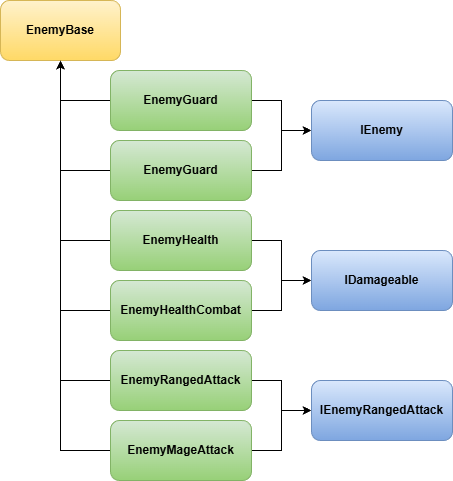
- EnemyBase – I use this as the most base class that actually holds reference to all the below classes. That way, when I need to reference this specific enemy, I just inject EnemyBase and I have access to the entire structure.
- EnemyGuard implements IEnemy interface – handles some top-level things like death handling and rewards to player
- EnemyArcher implements IEnemy interface – slightly different implementation of a ranged enemy
- EnemyHealth implements IDamageable – separate health class for when the enemy is outside of combat (for stealth kills)
- EnemyHealthCombat implements IDamageable – separate health class for when the enemy is within a combat (different health bar), but this and the one above both implement same interface that handles taking away health and healing
- EnemyRangedAttack implements IEnemyRangedAttack – special implementation for enemy as an archer
- EnemyMageAttack implements IEnemyRangedAttack – special implementation for enemy as a mage (both this and the one above implement the same interface because both have ranged attack logic)
- and many, many more
- VariableResolver – central service locator pattern I used. Very often called a big antipattern in many programming languages if done improperly, yet somehow I found it very useful in my game development. I understand some people might heavily object on using it, but for my case it was always quite useful especially since the scope of the VariableResolver was not too heavy and every single scene of my game used the same dependencies. What is it specifically? It’s one serialized class that holds references to all my most important classes, like SoundService, PlayerMain, SceneHandler, etc. In each level, I have in the top hierarchy of objects this “VariableResolver” added and underneath that game object, I have one game object with each script (to keep it tidy and organized). For example:
- Game – contains VariableResolver script, this is also a prefab (template/blueprint?) which means I can reuse it across scenes.
- Scripts
- SoundService
- SceneHandler
- WeatherController
- etc.
- Player
- Scripts
- PlayerMain
- PlayerHealth
- PlayerCombat
- etc.
- Scripts
- Scripts
- Game – contains VariableResolver script, this is also a prefab (template/blueprint?) which means I can reuse it across scenes.
- As you can see, the above structure allows to add one object to each of my scenes and I have it perfectly prepared with all references in place. If any of my scripts needs to access SoundService to play a sound, they just use one reference – VariableResolver.
- Still, your team or project standards forbid god objects. This worked for my solo projects with limited scope; on larger teams or long‑lived codebases, you’d likely want to replace this with dependency injection or a more formal service locator to avoid an ever‑growing object.
What are the traps you have found?
Feel free to share in the comments section what kind of other interesting traps you have found in game development, I’m curious to learn about your specific cases. Thank you for taking the time to read my blog post! More to come soon!